A board that follows your workflow.

Our software development service

Keep your project manager. We’ll work on your product.

Your manager directs the work on the board. Our agents do most of the development, with a person on our team you can reach when an agent gets stuck or an urgent issue needs attention.

Software delivery Example lists · rename them to fit your process
  1. Backlog
    Choose the next change Your priorities
  2. Plan
    Agree the approach Agent investigates · you answer
  3. In progress
    Build the change Code · tests · pull request
  4. Review
    Review the pull request Feedback · revisions
  5. Shipped
    Check it in production Deployment · verification

Follow the stages from left to right

Example stages. Keep the review and release steps your team needs, and name the lists accordingly.

Your manager already knows what needs to change.

If you work with an outside development team, someone on your side sets priorities, answers questions, and checks the result. That role carries over to Kardbrd.

Our team takes on work from your backlog. Our agents investigate the code, open pull requests, and respond to feedback. Your manager follows the work and makes decisions on the board.

You have someone to call on.

If an agent gets stuck, or something urgent needs attention, reach out to our team. A person steps in to investigate and help move the work forward.

Before we start, we agree how you contact us, who approves releases, and what support your product needs. Keep the decisions on the card so your manager, our team, and the agents can follow what happened.

Inside the workflow

Follow the work from a plan to production.

The agent brings the links and outcomes back to the card, so your manager can follow the change without piecing together its history.

Examples from our own Web board. Notifications v2 supplies the plan, pull request, and deployment excerpts; the GitHub review is from a separate onboarding change. Card excerpts are shortened and shown in an isolated demonstration workspace.

01 · Plan on the card

See the approach before the code changes.

The agent investigates the application and comes back with a plan. Your manager can answer questions or correct the approach while the goal is still clear.

For our notifications change, the plan explained how the app would show unread cards and which parts needed to change.
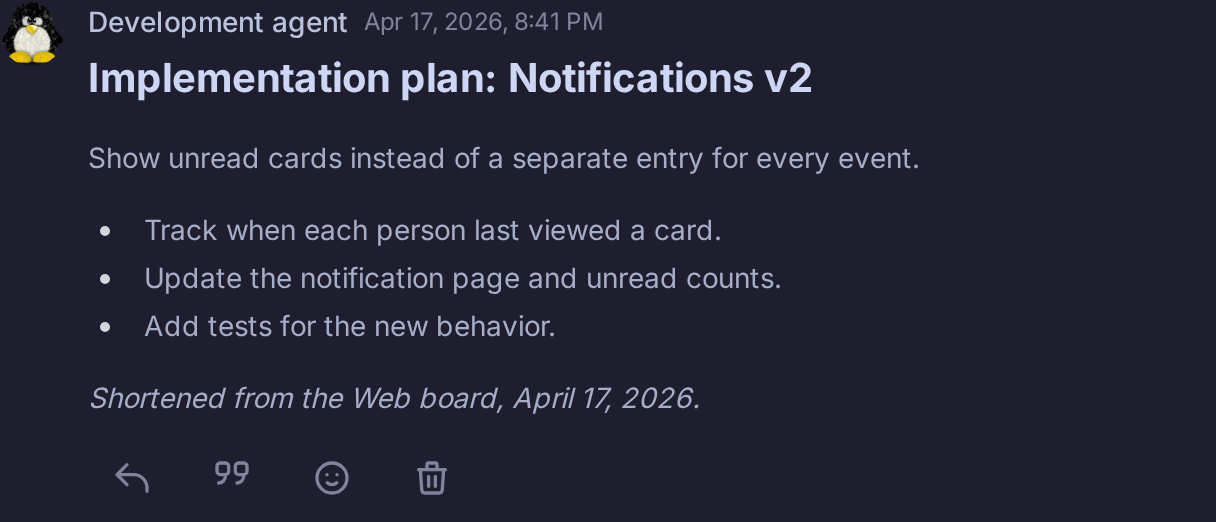
Notifications v2 · Plan
Shortened Kardbrd plan: show unread cards, track when each person last viewed a card, update notification counts, and test the new behavior.

Web board · April 17, 2026 · Re-rendered excerpt
02 · Pull request

Open the change in your repository.

The agent implements the work, runs the relevant checks, and returns the pull request link to the card. Reviewers can inspect the diff and try the changed behavior.

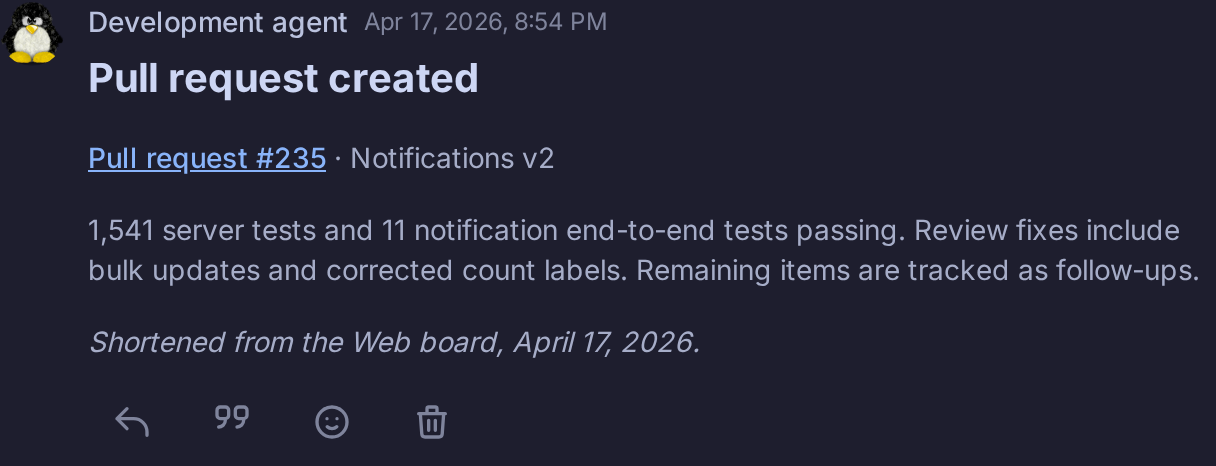
Here, the handoff includes test results and notes about the review fixes and remaining follow-ups.

Notifications v2 · Pull request #235
Kardbrd card excerpt links pull request 235, records 1,541 server tests and 11 end-to-end tests passing, and identifies review fixes and follow-up work.

Results reported by the agent on the card. Pull request #235 was merged.

03 · Review on the pull request

Give feedback where the code is reviewed.

A review can happen on GitHub. Give the agent the review link and ask it to address the comments, then return with the changes.

On our onboarding pull request, a reviewer flagged a form losing its input after validation. The owner asked the agent to read the review; the card records the fix and a follow-up pull request.

GitHub review · Onboarding · Pull request #38
Preserve the input when validation fails
“The error response should include the goal value in the context so users can see and correct their input.”

Agent response recorded on the card → Fix included in pull request #40

Excerpt from an actual Copilot review, February 11, 2026. The follow-up fixes were submitted after #38 had merged.

04 · Deployment and verification

Know what reached production.

After the required approval, the agent can carry out the release and bring back the deployed version and verification results. Your manager has a record of what shipped and where to check it.

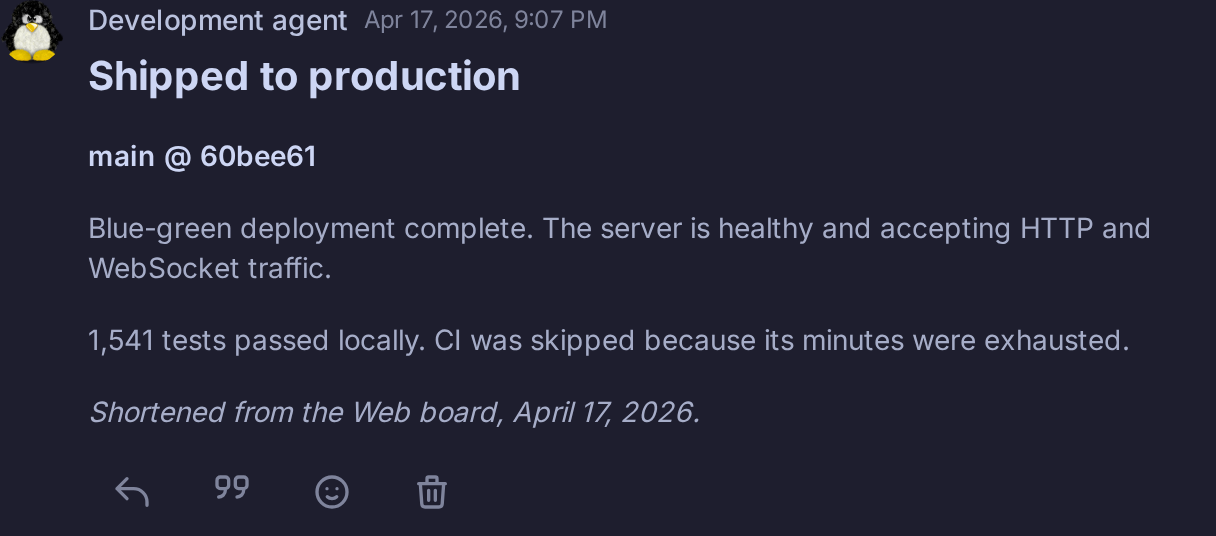
Our notifications card records the release, the server health check, and the checks that ran locally. It also records that CI was skipped because its available minutes had run out.

Notifications v2 · Deployment acknowledgement
Deployment excerpt records main revision 60bee61, a completed blue-green deployment, healthy HTTP and WebSocket traffic, 1,541 local tests, and CI skipped due to exhausted minutes.

Web board · April 17, 2026 · Agent’s deployment and verification acknowledgement

Try it on work you would otherwise send to your development team.

Bring us a change in the software your business already runs. We’ll agree what it should do, who will review it, and how it can reach production.

Then compare the completed work and the time around it with your current arrangement. Include your manager’s time, technical review, AI usage, and any setup the application needs.

Before you hand over a change.

Can we use this with our existing software?

Yes. We’ll look at your application, source access, and development environment with you. Then we can agree the setup our agents need and choose a first piece of work.

Does our project manager need to write code?

Your manager sets priorities, explains the business rules, and checks the result. Our team handles the agent work. Before we start, we agree who reviews code, approves releases, and handles production issues.

Who do we contact if an agent gets stuck or something urgent happens?

You can reach a person on our team. We step in to investigate when an agent cannot continue or an urgent issue needs attention. We agree the contact route and support arrangements with you before work begins.

Can we start alongside our current development provider?

Yes. Choose a contained piece of work and agree access, review, and release responsibilities. Your current provider can remain involved while you find out which tasks agents handle well.

What happens when a review finds a problem?

Give the agent the review feedback or a link to it. It can revise the pull request and run the relevant checks again. Keep unresolved questions and follow-up work on the card.

Can an agent deploy changes?

An agent can deploy when it has the necessary tools, access, and instructions. Your workflow determines who authorizes a release and what checks must pass. The deployment acknowledgement and verification should come back to the card.

How is the service priced?

An initial payment covers the guardrails, an environment where agents can work effectively, and the first three months of regular service. A monthly service fee follows from month four. We quote both amounts for your project before work begins.

Will this reduce our outsourcing costs?

It can let agents take on work you currently pay a development team to do. Compare similar completed tasks, including setup, AI usage, human review, support, and your manager’s time. A first piece of real work gives you a better basis for that comparison than a promised percentage.

Which change would you start with?

Tell us about your application and one change you want to make. We’ll discuss how our team can take it on and the human support your product needs.

Discuss your software